Data Modeling Toolbox
The Data Modeling Toolbox provides a basic set of elements for database modeling and database design, in conjunction with the UML Data Modeling Profile.
Data Modeling Toolbox page
|
|
|
|
|
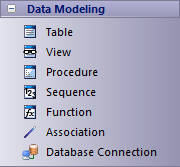
In the data model, a:
| · | View represents a database view |
| · | Procedure represents stored procedures |
| · | Sequence represents a database Sequence |
| · | Function represents a database Function |
| · | Database Connection helps you to configure a connection to the database you are modeling, for testing, import and export of schema, and comparison of differences between database and model using the Database Builder
When you drop this icon onto the diagram the system prompts you to indicate whether to create the connection for an Access database, a Firebird database or an ODBC database
For the first two options, when you click on the OK button the system prompts you to select the file to create the connection to
If you select the ODBC database option, the Select Data Source dialog displays; click on the Machine Data Source tab and select the data source (project on a database)
After you have defined the data source, when you double-click on the element the Database Builder view opens for the current database model |
|
Table
Views
Stored Procedures
Sequences
Database Functions
The Database Builder
|
Notes
| · | To add an element to the currently-open diagram, click on the appropriate icon and drag it into position on the diagram; set an element name and other properties as prompted |
| · | To add a relationship, click on the appropriate icon, then click on the start element in the diagram and drag to the end element |
Learn more
The material ("material" includes all pages, documents and on-line graphics) on this web site is protected by copyright law. (C) 1998-2015 Sparx Systems Pty Ltd.